It's been a while since my last post and I've been busy working on several different Pulp projects. One such project I want to talk a little bit about is called Rule of Mist. I'm not quite ready to share more about what the game actually is (other than the name) but here are a couple of small tricks it makes use of!
Cardinal and Intercardinal Player Facings
In Rule of Mist the player is sometimes represented as a tiny figure alongside a flag and at other times as a sailing ship. In both cases the player can face in different directions but how that works exactly varies between the two, as you should be able to see in this comparison:
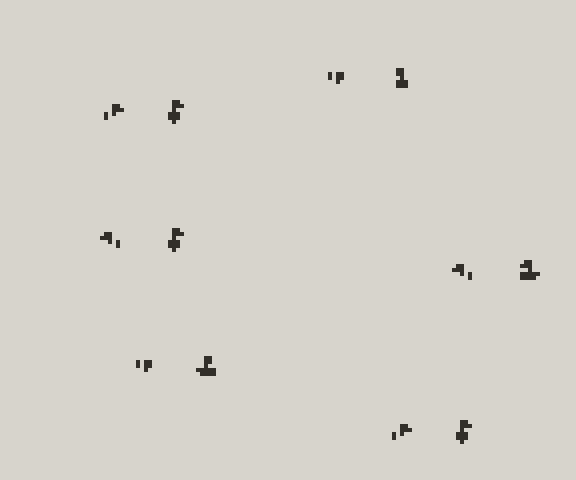
The ship is the simpler of the two and behaves in the familiar way for most top down adventure games with four cardinal facings. By this I mean the ship can face in one of four directions of north, east, south and west. These correspond directly to the four directions of the d-pad e.g. if the player presses left on the d-pad, the ship will face to the left. This is a stateless operation as it does not matter which direction the ship was previously facing. The facing simply changes to match whatever direction is pressed. This is implemented with some simple if conditions and swaps in the player update event.
The figure and flag on the other hand have intercardinal facings, meaning that they can face north-east, north-west, south-east and south-west. There are still only four facings but they do not directly correspond with the four directions of movement on the d-pad. If the player presses left on the d-pad, the player tile will face either to the top-left or bottom-left depending on their previous facing. This is now a stateful operation. Essentially the x and y axes must be separately considered with the last left/right direction combined with the last up/down direction to derive the current facing. This is implemented with a couple of additional variables to record that state in the player update event.
These intercardinal facings achieve the look I was going for as the tiny figure and flag look better composed on a diagonal to each other, and I think it makes simply moving around a little more fun. At the very least there is more of a distinction between the two player states. I've been struggling to think of other games that use intercardinal facings with cardinal movement and would love to hear of any other examples. There are many games with eight directional facings and diagonal (or 360 degree) movement but that's not quite the same!
Rounded Window Corners
Transparency in Pulp is limited to player tiles (ignoring any hacking around with changing the tile type of existing player tiles). When editing the font tiles, including the tiles that form the window for the window, say, ask and menu functions, transparency cannot be used. This means that the window always has straight rectangular edges. I want rounded edges like this!
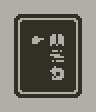
The trick here is to use the fill function in the player's draw event to draw two black overlapping rectangles behind the window, offset ever so slightly so as to create a border without covering the corner pixels. The draw event looks like this:
on draw do
  if draw_menu_border==1 then
    fill "black" at 7,9,34,38
    fill "black" at 9,7,30,42
  end
end
where the exact fill coordinates (in units of pixels, not tiles!) match the position of the menu in this instance:
on confirm do
  draw_menu_border = 1
  menu at 1,1 then
    // options etc.
  end
end
Note how drawing the borders is conditional on a variable that has to be set when calling the menu function and unset when the menu is dismissed. The latter is a good use case for the select and dismiss events in the game script:
on select do
  draw_menu_border = 0
end

on dismiss do
  draw_menu_border = 0
end