OUTSIDE PARTIES horror scavenger hunt across a 1442-megapixel HDR image

Thanks! No major new specifics yet—it’s coming along but my own projects have to come second to client work :confused:

Outside Parties is tied for #1 priority among my own projects though! And although the creative work has just begun, the technical work is mostly complete.

.
And here’s that Community Direct trailer (also winner of Best Trailer in the 2023 Community Awards)—timestamped at 1:28:

2 Likes

A couple audio tricks to share:

First, for scrolling, I’ve turned the UI clicks into a Shepard scale. It works really well with short clicks: it sounds like each click gets lower in pitch no matter how far you keep scrolling down, and higher as you keep scrolling up... and yet the clicks never get very high or low. A useful illusion:


Second, I finished the text ticker that provides subtitles for every spoken signal. For readability, the text doesn’t move/slide, it stays static and paginates.

Outside Parties Text Subtitles Test

Here’s how the text and spoken dialogue stay in sync:

• The dialogue script is all in a Lua table.

• The script snippets are converted on the fly into audio filenames to be loaded from disk as needed: every file is named for the LAST 4 words, minus ending punctuation. (The last words seemed to be more distinctive than the first.) I also use the last words as the mission “title” in the log list (like the one you can see at the top of the screen above). But for that it's not just a word count, it measures the font and fits as many words as possible.

• Every piece of dialogue is in two halves—two separate audio files: typically one relaying a bit of story, and one relaying something new to go searching for.

• The user hears the two WAVs as one: they are played one after the other. But this modularity lets me quickly adjust the mission tree and story beats if I need to, EVEN after dialogue audio is all done. I can move a difficult quest later, for instance, without messing up the story by having to make the attached story piece also occur later. (There is no exact order—with multiple open quests at once, people will find things in different orders. But the mission tree creates a general chronological structure: the major mysteries won’t get resolved until late.)

• The text ticker code divides the dialogue script into 1-line “pages” that are about 2/3 the screen width and fit nicely below the panoramic image, with room left for UI at bottom-left.

• But I can’t just run those pages with equal time to match the duration of the spoken WAVs. That’s a poor match between text and voice, because some pages fit more words than others. (I never truncate or hyphenate the subtitles, so a long word may need to get bumped to the next page.) So every page has an independent duration calculated on the fly.

• I also don’t start a fresh page for the second WAV—they are supposed to be one single transmission after all. So the script of both halves is combined before pagination. That means that one of the middle pages typically transcribes the end of one WAV and the start of the other.

• Now we have a switch of audio file that happens in the middle of a text page, and pages of arbitrary numbers and durations. So the audio and text have to be on completely independent timers.

• But I pad the audio timers with an extra second of silence between the WAVs—where a pause would have naturally been had they been spoken together. And then even more padding, two seconds, before the signal loops.

• The end padding is easy to add to both text and audio timers. But the middle padding has to be added to just one specific page of the text, found by counting words.

• The text timing is not measured in seconds but in “time units.” Right now, every non-space gets 1 unit of time. That way a longer word naturally gets more time, a period adds a little time, and … three periods adds even more. What those time units equate to in seconds depends on how fast or slow the particular dialogue is spoken. By timing the total text “time units” to match the total audio duration, the text syncs automatically with fast and slow speech alike. And if I want go get fancy later and assign more time units to certain letters or characters, I can do so.

• So how do I add the middle padding to the page that needs it? How do I estimate one second of padding in terms of character units? Easy! I just add the character units for “one one thousand."

The result seems to be working nicely—it follows along well with the voice.

(I’m currently using realistic synth voices, ones that sound good and sure beat silent text! But still lifeless compared to what actual actors could do. I’m considering hiring some.)


Also... the story is complete! I’m hoping it will add some nice extra interest to the picture searching. And maybe even be a little scary. The stakes are not low...

6 Likes

Very interesting stuff! Will try the scale thing.

I'm still hyped about this game. Keep on truckin'

2 Likes

Neither of these modes of transportation gives me any confidence at all.

horsies

ferryman

2 Likes

Some visual effects (accompanied by a chime) when you find a target object:

Acquired FX

Also note the text at the bottom: as you crank the brightness (“noumenon phase”) to tune the image to clarity, the audio signal for the next mission also comes in and gets audibly clearer. The text transcript of that voice at the bottom does the same: it transitions from a letter jumble to accurate words as you crank. A little extra help if you can’t hear well or have the sound off.

1 Like

With the story done, I’m at the stage of building all the art and dialogue to execute it. But I also can’t help continuing to refine the imaging engine... As if it wasn’t complex enough already, I’ve added one more layer!

When the brightness is cranked too light or too dark for the region you’re viewing, large areas can go to fully black or white. That’s OK most of the time—but if you ALSO zoom in really far (32x or 64x) then those areas can be really large: you can sometimes get a fully empty black or white screen, or close to it.

At that point, you can’t even see when you pan/scroll with the d-pad. No big deal, obviously you need to crank the image brighter or darker! But I just I didn’t like the look and feel of those blank open areas.
_

Solution: add a little grain to the image, only visible at the highest zooms.

It uses kDrawModeXOR so it works on any underlying graphics.

That way there’s a hint of texture you can see scroll. It also just looks nice I think! And it doesn’t harm the image: zooming in that far is mainly for fun anyway, and the grain is pretty slight.

But I didn’t want repeating grain. If it’s all/most of what you’re looking at at those moments, then I didn’t want you to see the same cluster of dots keep going by at the same interval all lined up in a row.

Making the scrolling grain image large is a start: twice the dimensions of the screen. But it would still repeat, just less obviously.

To test this, I temporarily added a bold test doodle to my grain image. (It’s actually a quarter of the full grain image but I repeated it 4x.)

grain without flips

That’s the repetition I did not want.
_

Solution: randomized grain.

Originally I was going to randomly flip each instance of the grain, and/or have a table of multiple different grain images (as if I’m not pushing RAM enough already). There would still be entire screens of repeating grain sometimes, but much less often.

That’s easy—just pick a random index 1 to 4 from this table:

flips = {gfx.kImageUnflipped, gfx.kImageFlippedX, gfx.kImageFlippedY, gfx.kImageFlippedXY}

But luckily, since my engine only redraws the newly-revealed portion of the screen as you pan, I have a way to do even better: randomize the flip of each new strip that is rendered.

grain with random flips

Now you’re talking! One source image, endless random grain.

Just one problem: as you pan, my engine pre-renders a whole range of different brightness levels. That’s what keeps cranking fast and smooth. But it means you now have random grain that changes as you tune the brightness. This gave the whole screen a distracting animated “sparkle” effect. It looked neat, but it looked very wrong.
_

Solution: deterministic pseudo-random grain.

I thought, what if I generated the flip number 1 to 4 from the pan coordinates with no random component?

Modulo (division remainder, the % operator) can easily turn any positive number into a number 0 to 3. Add 1 and I have my flip table index that changes with panning on either axis:

flips[(viewX + viewY) % 4 + 1]

No more sparkle! But how does it look?

It turned out the coordinates alone produced a repeating result horizontally (just the luck of how the numbers happened to divide). All I had to do to fix that was add a fixed integer (say, 3) to the coordinate sum before the modulo.

Then it looked random! However, the grain also did not change when zooming between 32x and 64x. Again, it felt wrong.

So in addition to a fixed integer, I also added the index of the current zoom level. Now there was a non-repeating result that looked random, didn’t sparkle, and was unique at different zooms.

flips[(viewX + viewY + 3 + zoomNum) % 4 + 1]

Success! Completely deterministic, fast, and with repetition being infrequent enough to satisfy me.

grain with deterministic flips

Remove the test doodle, and here’s the grain alone:

grain alone

1 Like

Two more imaging engine enhancements:

  1. You can now scroll past the top/bottom of the panorama—making it more intuitive to zero in on targets near the edges.

  2. You can now zoom out farther, to .25×. (Those zoom numbers are simply the “number of screens tall” the panorama is, so this new zoom level fills 1/4 of the screen height.)

So now you can see the ENTIRE “psychopanorama” at once. (A) and (B) to zoom.

max to min zoom

1 Like

At min zoom, the panorama is 55x400 pixels, less than 1/4 of the total screen (since the 20px bottom UI doesn’t count).

At max zoom, the panorama has the area of 7.5 ping pong tables, or 20 standard interior (30-inch) doors.

1 Like

Most of my current work on this (in and among my clients’ tasks!) is too spoilery to relate, but there are some things I've been posting on Mastodon that I’ll share here too:

18th century Italian physicist Cristina Roccati made endless sketches and inkblots of “le sfere nere”—strange “black spheres” that terrified her. Her occult secrets were buried with her (literally). But they didn’t stay buried. The secret organization that claimed both her methods and her name used the sfere nere as their emblem. The Cristina Roccati Institute still exists today, exploring things better left alone. But to this day, even the CRI doesn’t know… What are the sfere nere?

1 Like

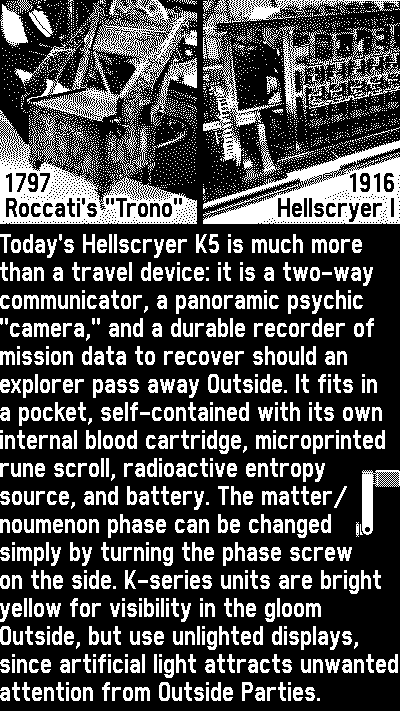
Every model of Hellscryer since the H series is bright yellow so it can be located quickly in near darkness or in altered states. K-series units now use unlighted displays, since artificial light can attract unwanted attention from outside parties. Each Hellscryer is locked by means of a 3-digit passcode. DO NOT BE LAX ABOUT SECURITY. The Hellscryer is extremely dangerous in untrained hands, and an easily-guessed passcode could put non-CRI individuals at risk if a unit accidentally comes into their possession.

The contemporary version of the CRI logo appears on the unlock screen:

OUTSIDE PARTIES Passcode

And lastly here’s a launch animation:

OUTSIDE PARTIES launch sequence

4 Likes

I haven’t been posting many details here (I’ll write up more after release!) but here’s something kind of fun—how I keep the voices and text ticker in sync…

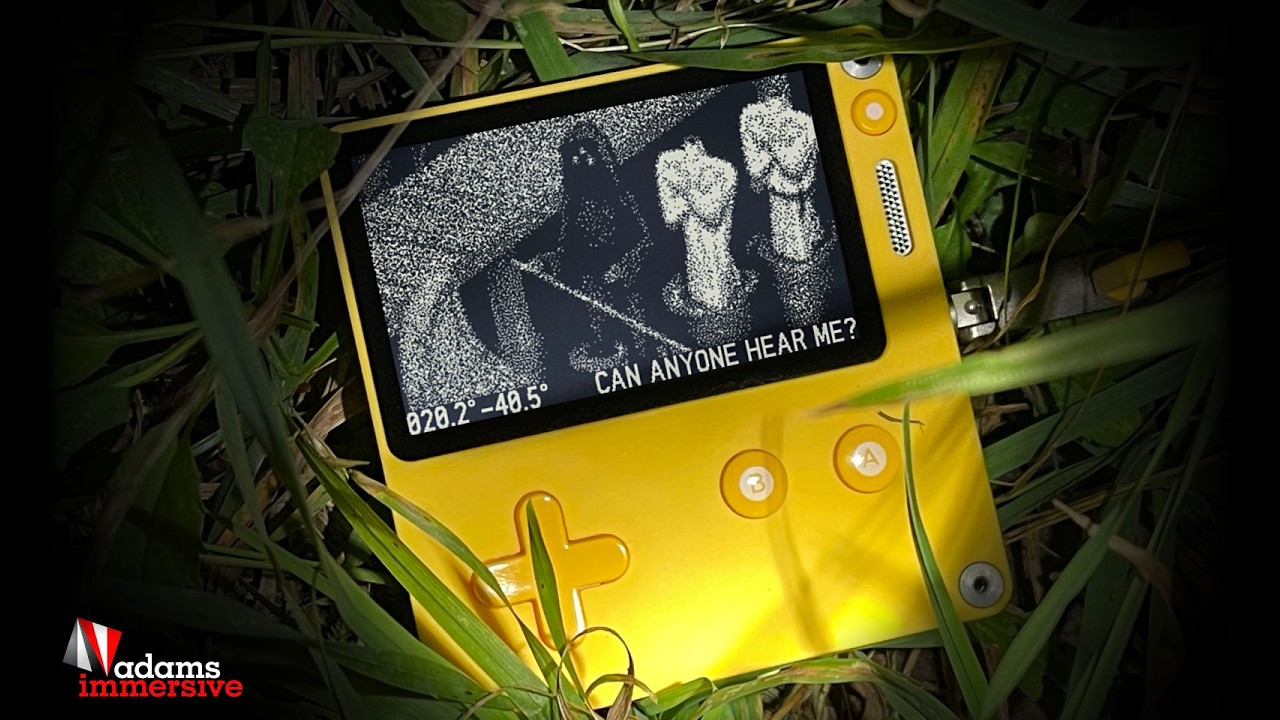
Each found item has a voice signal that plays, accompanied by a text ticker at the bottom of the screen. Both the voice and the text “unscramble” together as you tune the image in using the crank.

The text is just a single long string in a table. But it stays well enough in sync with the voice by two very simple means:

  1. Each long string is paginated programmatically into one-line ticker “pages.” (Some pages are longer than others, depending on how many words fit.) Then every letter is assigned to equal one generic “time unit,” and those time units are distributed into the duration of the WAV audio. So a page with 8 letters will appear for half the time of a page with 16 letters. That gets the timing pretty close to the voice, regardless of speaking speed.
  2. But I can do better: listening to the audio, I add punctuation that matches the voice. (This may differ from the punctuation in my original script, depending on how the voice actor performed it.) The paginator, as it adds up the “time units” per page, adds EXTRA units for punctuation. Periods especially—and ellipses are converted to runs of periods, so they add the most time. Simply by punctuating the text, which is good for readability anyway, the timing matches the voice much better.

It’s not perfect TV-quality sync, but it’s pretty good! I also add in a little extra time before the voice and its transcript loop and play again.

At the same time as the pagination is processed, the LAST words of the signal are automatically pulled out to become the visible title of each item in the list. All dialog is written so that the final spoken words describe the item to find.

So this…

I THINK I JUST GLIMPSED THE ROPE MAN FOLLOWING ME AGAIN. IF HE'S ONE OF THE PASSED HE IS DEFINITELY NO MINDLESS SPIRIT... I'M HOPING IF I FOLLOW A STRAIGHT LINE I CAN TRACE THIS PIPE.

…is broken into pages, but the last page might have just one or two words. That would not be a reliable “mission title.” Instead, the generated title is:

…I CAN TRACE THIS PIPE

(With final punctuation always stripped away, and ellipsis added.)

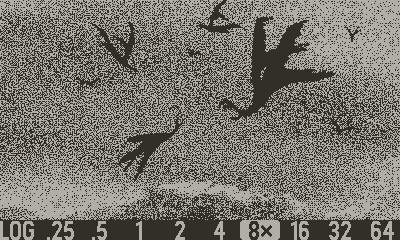
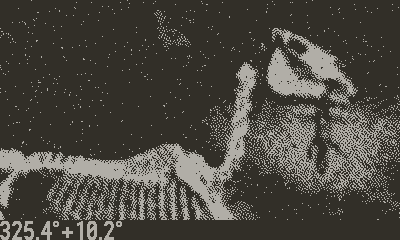
Also, here are some paravultures and a horse eating a lizard.

2 Likes

A lot hasn’t changed since the first post above!

But some things have. The device is not called a Panopticon K5, but a Hellscryer K5.

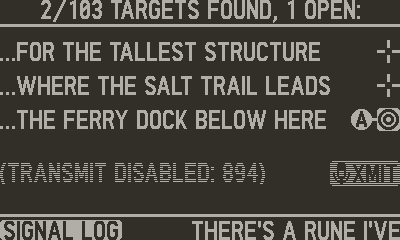
There’s a list of all targets called the Signal Log. (A list of 1, at first, then more and more are unlocked and get added.) You can select a target you haven’t found to go searching for it, or you can select one you already found if you want to look at it again.

So the list contains both things you’ve found AND things you haven’t. And just stepping through the list with up/down makes the audio signal for each object play—with subtitles in the ticker across the bottom—so you can easily review the story events if you wish. (But the clues to new targets are not story-dependent: you won’t have to go back and review just to make progress finding targets.)

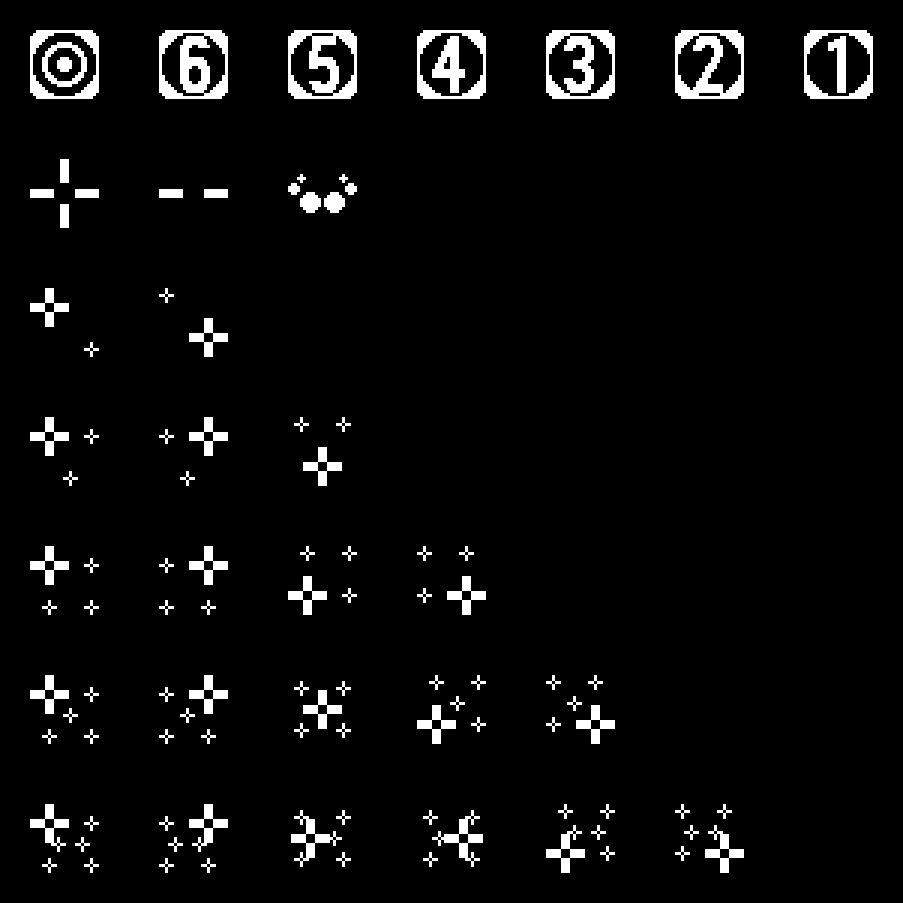
I needed really clear icons to distinguish open targets from ones already acquired. Here’s the system I came up with:

Open target to find:

badge-open

Already-found target (which matches the full-screen crosshair animation that happens when you find something):

badge-found1-table-23-23

The open target icons are bright and bold, so it’s easy to scroll through the list and spot any items you haven’t yet acquired.

But I found I needed a LOT more icons than just those two: I wanted to indicate “multi-targets” such as “5 salt runes” and show a number counting down.

So there’s this variation counting down how many are left:

badge-3

Additionally, sometimes you find an object whose voice audio does NOT describe a new target—just a bit of story. (Some “branches” of the quest have to reach an end, or the game would be infinite!)

It didn’t make sense for those “dead-end” items to receive the usual “target” icon when added to the list, because there’s nothing to find! But giving them the “already found” crosshair felt weird too, becase you didn’t... find anything. At the same time, I wanted an icon that looked similar to “aready found” so it wouldn’t catch the eye while scrolling the list on the hunt for open targets.

I came up with a “dash” icon that also happens to be half of the crosshair (along with a matching full-screen animation of horizontal lines when you first acquired the “dead end” item):

badge-none

I thought I was done... but I wanted multi-targets to look different in the list even after being fully acquired. So here’s the icon for a set of 5 items once you’ve found them all:

badge-found-5

Having the one big bold crosshair helps it feel similar to the normal single-crosshair icon.

But it also lets you cycle through the whole set for viewing previously-found targets. With the target line selected (using up/down), you can hit d-pad left/right to cycle through the set. Here are the three cycling icons for a set of 3:

badge-found-3x3

I made icons for multi-target sets of every size up to 6.

Lastly, after the game is over you can still freely revisit the whole list, and view or listen to anything you want. Since the list still exists when there’s nothing more to find, I thought the final target deserved its own icon.

It’s the logo of the Cristina Roccati Institute, as seen when you launch the game:

badge-sfere

Still mostly black, still distinct from the bold white “open target” squares. So despite all the icon variations, it still feels like just two “kinds” of icon: things to find (bold and white) and things already-found (slight and black).

1 Like

The game is out! (I do have more to log about the development process in future, but my first priority is a searchable walkthrough/hint site.)

The final game has 150 targets, and professional voice acting for each one.

2 Likes

I’ve made a couple of updates since launch:

11/25 v 1.1.0:

  • Fix for an occasional bug that could play the wrong audio (not matching the text)

  • Quieter background ambience during voices

  • Slightly quieter sound while raising the device in front of you to start each session

  • Boosted treble to make a couple specific voice clips stand out better (they had been lacking treble compared to most)

  • Less stereo panning of certain background sounds (a potentially annoying effect with headphones)

  • More variation in background sounds

  • Removed unneeded target bar in Void Monitor mode

  • Less-frequent music in Void Monitor (now the same as game play)

  • Fixed unwanted occasional clear voices in Void Monitor

  • Fixed situation in which game view could shift to top of pano upon starting a new game

  • Addressed a very rare crash when zooming with B

  • Unique icon in the Log list for the very last target once found

  • Misc. artwork tweaks to make certain things stand out a little better etc.

Today’s v 1.2.0:

  • Dozens of additional random background sounds (only about 2 MB app size increase)

  • New weighting system to better manage which sounds are more common vs. rare

  • New animated effects in home screen title card

  • New animated effects in home screen list view icon

  • Added skull to wrapping paper

  • Adjusted timing of text vs. spoken words for many signals

  • Misc. small artwork tweaks

  • Fix for potential crash when letting the Playdate auto-sleep during a popup dialog

  • Fix for some unintended voice fragments

  • Fix for Playdate sometimes failing to auto-sleep when left unattended with crank out

There will be at least one further update, adding a QR code for the searchable hint/walkthrough site I’m preparing. (If anyone finds a particular target to be especially difficult—unless that made it fun—I’d like to know!)

I’m also thinking of adding a few “invisible achievements”—never stated in-game, but appearing in your trophy case for those who use it. (I hadn’t even realized such an achievement standard existed on Playdate!)

P.S. The final app size came to 57.9 MB (half that when zipped). Not as bad as I'd feared, for around 1.25 hours of total audio and all that HDR imagery!