This is a weird one! If I use crop to crop the visible part of the room I expect the screen area outside of that to be tiled with the default “black” tile. Usually this works correctly. However if I invert the “black” tile (so that it is actually all white pixels) then in the simulator and on device the player tile is tiled outside of the crop area instead! This bug is not present in the browser player.
Here is how it should look, taken from the browser:

and here is the bug on simulator (which is the same as on device):
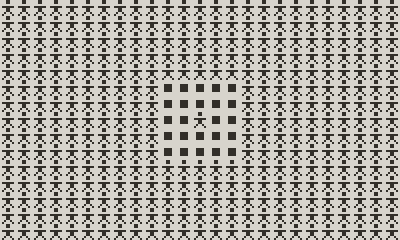
Here is a minimal PDX that recreates the bug (source code included within):
JBKFPNWMJICrop-Bug_20251020131554.zip (31.5 KB)
There are two workarounds I can use in the meantime, neither of which are ideal:
- Use
fillto draw white over the cropped area - Use
invertso an actually black “black” tile appears white
Option 1 is unnecessary performance overhead and option 2 means I have to invert every tile in the editor which is awkward to work with.