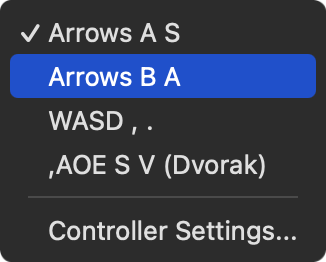
So, I've noticed another bug with SDK 3.0.0 and macOS. Playdate Simulator keyboard control randomly just stops working. I've got "Arrows A S" selected under Controls though. I've tried "Arrows B A" & "WASD , . " as well but, the bug persists.
For some reason, changing the "Screen Zoom" setting temporarily fixes this. But, if you quit Playdate Simulator and open it again, the keyboard controls just randomly stops working again. I'm on macOS 15.7.1. I never had this issue with SDK 2.7.6 though. Has anyone else seen this issue?
Can you make sure the main window has focus when this happens. E.G. make sure the crank field or other control doesn’t focus. The easiest way to do that is click on the main LCD screen. If you still see, please let us know.
Oh, I've made sure the main window has focus. I've used Command+Tab key combo multiple times and I'm still having the issue though. It's the randomness of the issue which is weird
if you can come up with a way to reproduce this consistently please let me know. When I see something like this it’s because the main screen doesn’t have focus.
One way for sure is this. If you try and change the Screen Zoom option, then the keyboard controls work. BUT, if you then quit the Simulator and reopen it, the keyboard controls don't work. That's the one consistent way I've been able to reproduce the error. Hope that helps
Yep, nuking the entire PlaydateSDK folder, and any preference/temp files regarding the Simulator, seems to have fixed the issue Maybe something got borked during the update from 2.7.6 to 3.0.0
Nope. Looks like the problem has been solved though. I've tried opening and closing the Simulator multiple times and I'm not seeing the keyboard control issue anymore Sometimes you just need to nuke everything from orbit
Damn, looks like it's randomly happening again I think it may be a focus issue after all. Hard to tell when it happens so randomly. Didn't have this issue with the 2.7.6 Simulator though.

 When I see something like this it’s because the main screen doesn’t have focus.


 Sometimes you just need to nuke everything from orbit
 I think it may be a focus issue after all. Hard to tell when it happens so randomly. Didn't have this issue with the 2.7.6 Simulator though.
 I'll try messing around with it more tomorrow.