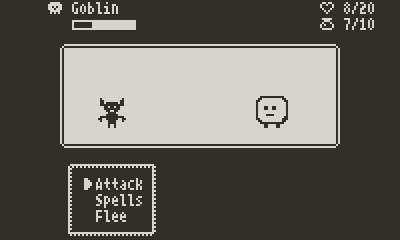
RPG Battle System

Hello fellow Pulp enthusiasts!

My son has started learning to code at school, so I thought it would be fun to introduce him to Pulp. He’s been having a blast creating several sprites and his little world. He’s even doing small scripts! While helping him on different coding aspects, I have been having fun testing things out and I’m really into it as well!

I’m also playing through the Dragon Quest 1+2 remake right now, and with that game fresh in my mind, I wanted to see if I could implement a JRPG like turn-based battle system in Pulp. I’m certainly not the first to do this. But it was a fun learning exercise to build my own.

I’m sharing the project here so that others can learn from it or use it in their own game.
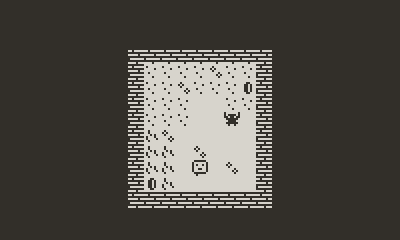
Pulp file:

JRPG Battle System.json.zip (7.5 KB)

PDX:

JRPG-Battle-System.pdx.zip (51.7 KB)

Some notes:

The battle system is menu based, leveraging the Pulp menu and say functions.

Some tiles are “wild” and have a chance of triggering a battle. Each wild tile has some logic to determine the type of enemy that can be encountered.

When a battle occurs, the player is moved to the battle room, and different sprites are displayed for the enemy and player. The actual player tile is hidden in battle. The player sprite is static in the room, but the enemy sprites are displayed dynamically over several tiles based on its enemySizeX and enemySizeY variables.

I used some item tiles has logic containers. These include:

  • battleSystem: all the logic to handle battles

  • enemyDefinitions: functions to initialize the variables for each enemy type. There are 3 currently: Slime, Big Slime and Goblin

The player script has a series of functions to adjust health, XP and coins. I wanted to centralize the logic there so that it will be easier to change it (i.e. checking for level up after the player gains XP)

What’s missing:

I have a good portion of what I want implemented. But here are some of the things I would like to add eventually.

  • Allow sprite animation in combat: this is tricky since the menu and say functions will pause tile animation. So an idle animation will not work with the menu open. However, an attack animation should be possible by using the wait function before showing the say message.

  • Create a logic container for the spells, so that the code can be reused. Right now, the code for the Heal spell is duplicated in the player and battleSystem scripts.

  • Add sound effects to battle actions and spells.

  • Have more than one enemy in a battle, and more than one character (party system).

  • I have some basic stats implemented, but some additional ones, a level up system and an inventory system would help in creating a better RPG experience.

I hope this can be helpful to someone. Let me know if you use it. I’m curious to see what others build with it.

5 Likes

I’m so excited to see more turn based RPGs made in Pulp! (I made Initial Daydream and was half the team making Otherworldly Effigy for Ware-Wolf). Love the sprite work here too!

We’re going to expand OE into a full release hopefully next year, so I’ll be doing a lot of this work parallel to you. Can’t wait to see where they both end up!

2 Likes

Great to hear you are working on a new project! I really enjoyed what I played of Initial Daydream. It was really clever to use “items” that the player needs to collect as a battle menu. Love the music as well. Really reminds me of playing the original Final Fantasy.

I still struggle with Pulp’s music and sound editor. I really have no idea how to make good sound effects, and even less music!

I haven’t work much on this project since posting. I was busy trying some other ideas. I need to get back to this as well.

3 Likes

Other half of the Otherworldly team here! Excited to see where you go with this! The Playdate definitely needs more turn based games :fire:

3 Likes

Yeah the sound stuff is probably the most intimidating part of Pulp, especially if it’s not something you have experience with. Someday I should make a video or something that gets through the basics of it to demystify it for people, because it’s actually quite fun once you get the hang of it, with similar interesting constraints that you have on the art and code.

I think somewhere on the forum here there’s a thread about tips for the Sound and Song channels that had a lot of really good stuff, I’ll see if I can find it.

Or maybe just make some Pulp music packs haha

1 Like

Here it is, specifically linked to ronlent’s comment, but there’s other good things in here too: Share your tricks for the Pulp music editor - #8 by ronlent

3 Likes

Thanks for the link! I’ll definitely check it out.

I made some progress this week. Started battle animations, added a spells system and basic sound effects.

I’ll post a new version when I’m done cleaning the code.

1 Like

Good evening, here is a new update!

  • Added a spell system

  • Added an animation system for battle animations

  • Added several sound effects

  • Did some code refactoring and clean-up to make it easier to understand

playdate-20251208-213725

Pulp file:

JRPG Battle System 0.2.1.json.zip (13.0 KB)

PDX:

JRPG-Battle-System 0.2.1.pdx.zip (62.4 KB)

Spell System

An item tile that contains the logic for the different spells. Whether they are used in battle or in the overworld (i.e. the Heal spell). This allows having the code for the spells centralized in the same place. I also set some variables for the MP cost of each spell there so they can be changed easily.

I would like to add a way to indicate to the player what each spell does. Like a sort of tooltip when on the spell menu item in battle. But I don’t think that is possible. The best option I see would be to add a sub-menu on the spell to choose to cast it or see its description, but I think that would be annoying once you know what each spells does.

A better idea would probably be to have a Spellbook section in the overworld menu where you can inspect each spell.

Animation System

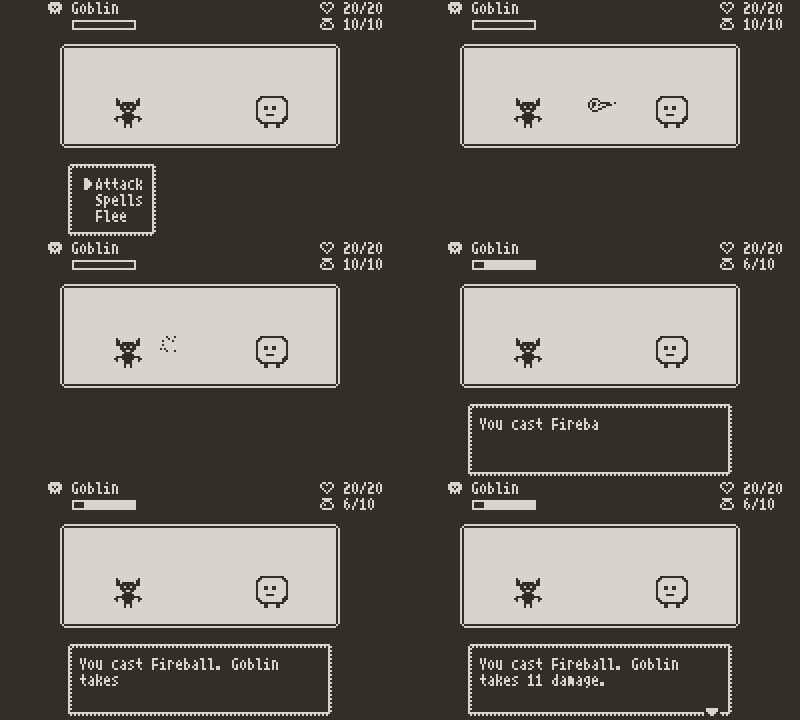
With the use of the wait function, and using the play function with animated tiles, it is possible to create some animations in the battle. The wait function is necessary since when a menu or say message is displayed, all tile animations are paused. It also makes more sense to see what happens before we display it in a message.

The animation system handles battle action animations for the player (attack and spells) and for the enemy attacks as well. It works by swapping in the sprites required for the animation, playing the action sound and setting an animationDuration. When the tiles have completed the animation, they are swapped back to the “white” tile.

The animationDuration is used by the wait function before performing the player or enemy action, displaying the results in the say message and continuing the combat.

Here is the fireball animation from the animationSystem:

on spellFireball do
	sound "spellFireball"
	animationDuration = 1.2
	x = 10
	i = 1
	while i<6 do
		tell x,6 to
			play "fireballAnim{i}" then
				swap "white"
			end
		end
		i++
		x++
	end
end

For this to work properly, the animationDuration should allow the tile animation (and the associated sound) to finish playing. Otherwise, the animation will freeze when the say message is displayed and it won’t swap back to the “white” tile. There is a bit of trial and error to find the correct duration.

The animations are called in the battleSystem handleTurn function:

// Check who's turn it is, perform action, then display result
on handleTurn do
	
	animationDuration = 0 // Default to no animation time
	if currentTurn=="player" then
		// Animate player action
		tell "animationSystem" to
			call battleAction
		end
	else
		// Animate ennemy
		tell "animationSystem" to
			call "{enemyId}Attack"
		end
	end
	
	// Wait for action animation before resuming
	wait animationDuration then
		if currentTurn=="player" then
			call "performPlayerAction"
		else
			call "performEnemyAction"
		end
		
		say "{msg}" at 4,10,15,3 then
			call "checkBattleState"
		end
	end
	
end

The tile animations themselves are a bit time consuming to create. There is probably a better way to create them outside of Pulp and import them in. If I would do a complete game, this is definitely something I would need to figure out.

Cheers!

This a great tool! would love to dive into developing an RPG, thank you!

1 Like