I use playdate.getCurrentTimeMilliseconds() to advance some simple, continuously looping animations. I’ve noticed that if I leave the app running in the simulator overnight that the animations stop advancing. At first glance I thought it was hanging, but imagetable animations continue to work as expected and the app is still responsive.
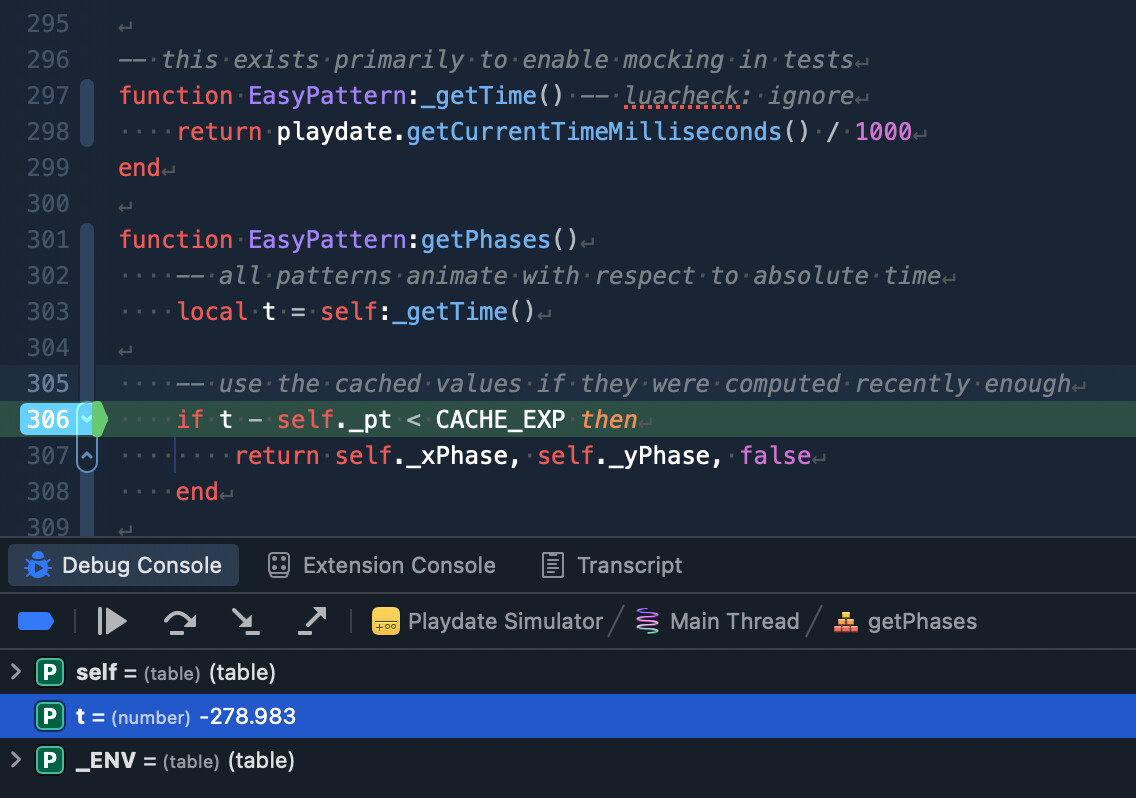
When I set a breakpoint to inspect the value being returned by getCurrentTimeMilliseconds() I noticed that sometimes it’s a very small number (relative to how long the app has been running), and other times it’s a decrementing negative number. This suggests both that the number is signed, and that it’s using a relatively low number of bits. Even if it were a signed 32 bit number it shouldn’t overflow for 20+ days; a signed 64 bit number wouldn’t overflow for billions of years. Is my expectation wrong, or is there a bug here?
Here’s a screenshot from the debugger which captures the issue I’m seeing in context. Note the value of t, which should represent the number of seconds since the app launched.
I think I've figured out what's going on here: On the Simulator, playdate.getCurrentTimeMilliseconds() uses gettimeofday for retrieving the time, as opposed to the SysTick on device. Here's how it works in the Simulator:
Basically, since usec is a 32-bit number, it will overflow after 4294.967296 seconds, or 1 hour, 11 minutes, 34.967296 seconds. However, it is stored the first time this function is called to offset the starting timebase, so the point it overflows becomes basically random depending on where the computer's clock was in this 1:11:35 cycle when you started the Simulator.
You'll also notice that pd_getCurrentTimeMillis is declared to return an int32_t - not uint32_t. Lua integers are all signed, so the uint32_t return value gets converted to a signed integer when it is pushed to the Lua stack.
Coupled with the 32-bit length it's using, this means that the value of pd_getCurrentTimeMillis becomes unreliable (in terms of clocks that always increase) immediately after it was first called, since the computer clock could be anywhere in the 1:11:35 cycle (including at the very end!) when the function is first called, which would yield a negative number for at most 35 minutes, 47.483648 seconds at a time.
The reason that nothing related to getting the current time breaks is because like int32_ts, Lua integers also overflow when doing integer math. The divide by 1000 in your code converts the integer to a floating-point number, which won't make any sense when compared with the amount of time the game has been running.
Huh. Thanks for the explanation! I think you’re right, as I’ve now seen this happen within minutes of launching the app. I was miscalculating that a signed 32 bit int would support a 24 day cycle because I was off by a factor of 1000, accounting for milliseconds only, not microseconds.
It sounds like there’s really no way to mitigate this or work around it in my code. Is that correct? Is there a potentially better implementation of this function in the simulator, suggesting this should be treated as a bug and fixed? Or should I just ignore it entirely because it won’t have any impact on device?
Have you tried using getElapsedTime()/resetElapsedTime()? Since you reset it every frame you should not have the problem, especially if you accumulate the time in a 64 bit integer.
Edit: well, on Lua you can't really use a 64 bit integer afaik, but you should still be able store the time in a way it doesn't overflow, like using multiple variables or something like that
That might work in theory, but isn’t a viable solution for my use case. I’m working on a class/library designed for anyone to use. It’s important to keep it a drop-in, and getElapsedTime isn’t reliable since the app may or may not depend on resetting it each frame (or some other interval). I need a monotonically increasing millisecond value, which is exactly what getCurrentTimeMilliseconds purports to be.
Looking at the implementation again, I’m confused as to why it first computes a microsecond value (usec) and then divides to obtain millis. This results in a loss of precision. If instead it computed millis from the high precision result of the call to getTineOfDay in the first place, then we wouldn’t lose the precision and the window to overflow would be 24 days instead, right?
@scratchminer ‘s implementation isn’t exactly what it’s doing, but it’s close-ish. I’m changing the sim to use C++’s steady_clock to avoid the possibility of the system clock changing incorrectly. But after that, the real issue is truncation of the microsecond value before being converted to milliseconds, not after.
Roger, thanks. I think we’re aligned — your last statement supports the suggestion made in the comment above, right? That would avoid the truncation by removing a factor of 1000 in the conversion multiplication from microseconds, I believe.
Has the issue been fixed? 3.0.2 supposedly brought a fix for the function on Simulator.
While the doc says “since some arbitrary point in time” for the function, for me it seems to be consistently around game’s launch, starting in the low 4 digits. If this is always the case, maybe something like that should be clarified in the docs? If it started in a very high range with risk of overflow (even if only internally inside the SDK) while the game is active the function would be useless... I’m using getCurrentTimeMilliseconds for my gameplay loop’s fixed timestep as opposed to getElapsedTime and it’s working flawlessly so far, so interested in it working the way I’m understanding it as well.