Windows, SDK 3.0.5, reproduced on Simulator and Device
Can someone tell me what’s going wrong here?
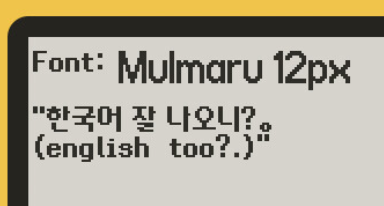
I’ve got a Korean font I’ve exported from Caps, and the Korean glyphs render fine in Caps (note the ‘X’ shown for the space character, that character isn’t in the font yet):

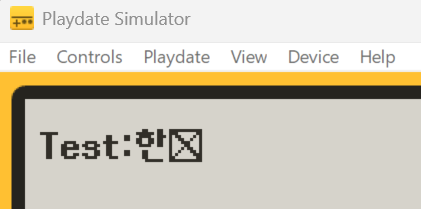
But this is what shows up in Simulator and on device (all that shows up is the English text and the ‘X’ for the missing space):
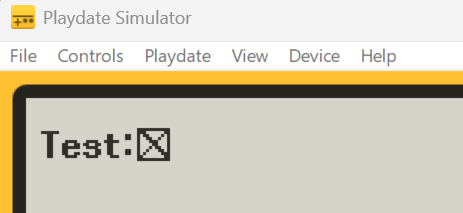
The code is dirt-simple (main.lua):
local gfx = playdate.graphics
theFont = gfx.font.new("fonts/Mulmaru-12px")
gfx.setColor(gfx.kColorWhite)
gfx.setImageDrawMode(gfx.kDrawModeCopy)function playdate.update()
gfx.fillRect(0, 0, 400, 240)
theFont:drawText("Test:한국어 글리프", 5, 10)
end
Test case:
ktest.pdx.zip (59.3 KB)
Project/source, including .fnt/.png used:
KoreanFontTest2.zip (391.5 KB)
(I know this may be somewhat redundant with the discussion going on over here, but IMO this thread has isolated the problem to either a Caps issue or an SDK issue, as I’ve removed all non-Panic-bits from the scenario, hopefully as presented here this issue will be straightforward to at least reproduce)
Edit: Note that it’s not just that the glyphs don’t render, there’s not only not an ‘X’ where they should be if they weren’t ‘found’ in the font, there’s nothing… not even an empty space. It’s like pdc itself saw ‘한‘ etc. and just said ‘Nope!’ and skipped over them entirely.



 It's an easy fix, just use an int for the value in the code and if the file says 0 then we know it's actually 256 because pages with 0 glyphs wouldn't be included in the file in the first place. I don't think we've officially started release testing on 3.1 so I think I'll be able to slip it in before the door shuts. If not it'll be fixed in 3.1.1.