Help with arc animator collision

,

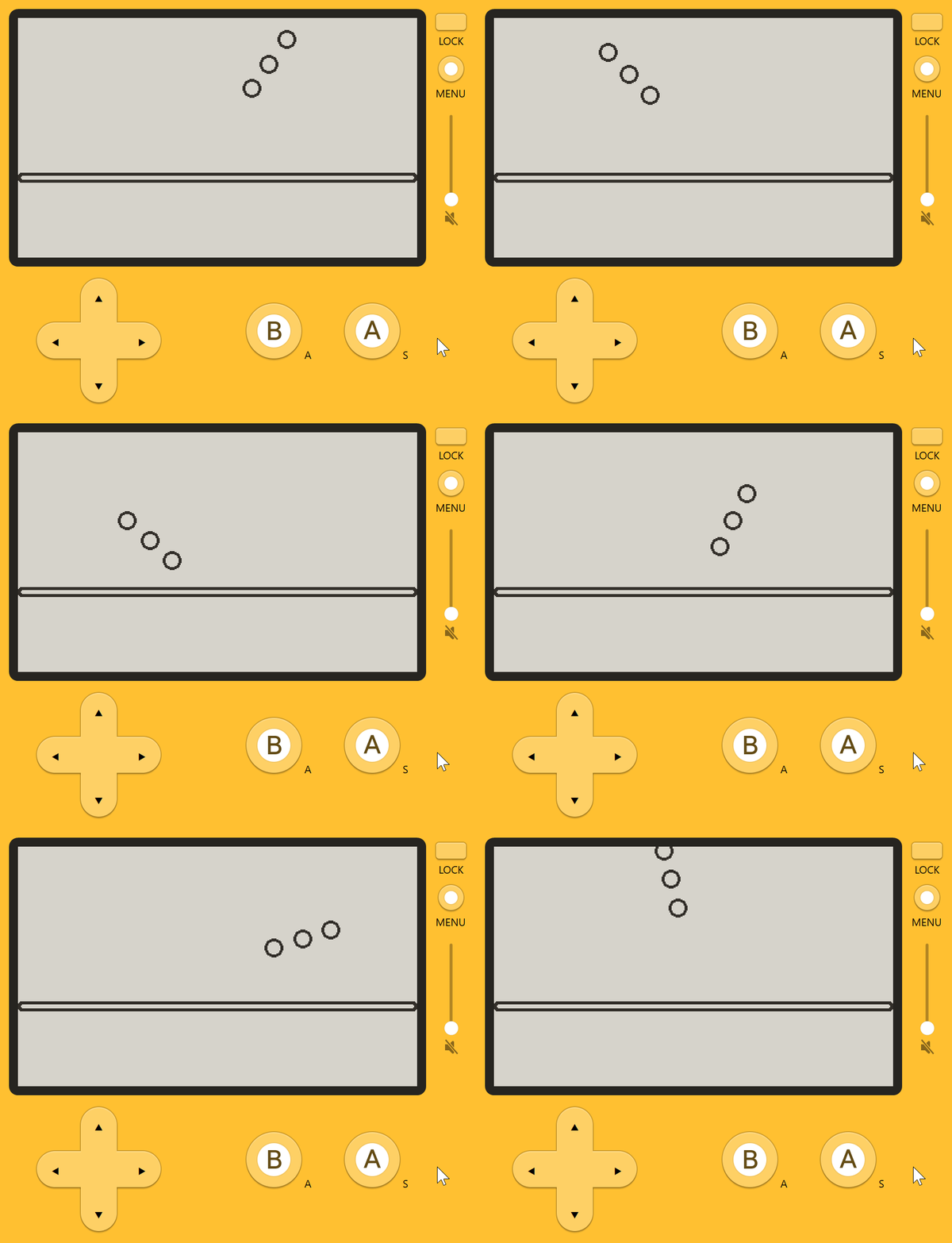
I’ve been trying to create something in a similar vein to Game & Watch: Ball and am trying really hard to get a ball sprite to animate over an arc, but bounce back on the same path when it hits a collision. The behavior has been really unpredictable and crazy (to me), I can tell I'm not using some system properly, but I just can't seem to figure out how to get this to work :face_with_spiral_eyes:

The sprites seem to be tied to a specific motion on the arc and can't move around it freely most of the time, and when the sprite returns it follows a very slightly different path than before. When I use shapes other than arcs or re-position things, the sprite sometimes teleports to the starting point and won't bounce back at all. Does anyone have any idea how I could be doing this better?

I combined my different objects into one file to make it easier to send but can't seem to send the two sprite images, I hope it works. Thanks so much! :orangutan:

(I'm on Windows! forgot to add that)

PlaydateSimulator

import "CoreLibs/object"
import "CoreLibs/graphics"
import "CoreLibs/sprites"
import "CoreLibs/timer"

local pd <const> = playdate
local gfx <const> = playdate.graphics

-- Create a ball
class('Ball').extends(gfx.sprite)
local ballImage = gfx.image.new("images/ballSprite")
function Ball:init(x, y)
    Ball.super.init(self)
    self:setImage(ballImage)
    self:setCollideRect(0, 0, self:getSize())
    self:setGroups(1)
    self:setCollidesWithGroups(2)
    self:moveWithCollisions(x, y) 
    self:add()
end
function Ball.collisionResponse(other)
    return gfx.sprite.kCollisionTypeBounce
end


-- Create the floor
class('Floor').extends(gfx.sprite)
local floorImage = gfx.image.new("images/floorSprite")
function Floor:init(x, y)
    Floor.super.init(self)
    self:setImage(floorImage)
    self:setCollideRect(0, 0, self:getSize())
    self:setGroups(2)
    self:setCollidesWithGroups(1)
    self:moveTo(x, y)
    self:add()
end

-- Game logic
function BallGame()

    local arcX = 200
    local arcY = 120
    local arcR = 90
    local arcStart = 0
    local arcEnd = 360
    local ballSpeed = 2000

    local arcGeo = pd.geometry.arc.new(arcX, arcY, arcR, arcStart, arcEnd)
    local arcGeo2 = pd.geometry.arc.new(arcX, arcY, arcR + 30, arcStart, arcEnd)
    local arcGeo3 = pd.geometry.arc.new(arcX, arcY, arcR - 30, arcStart, arcEnd)

    ArcAnim = gfx.animator.new(ballSpeed, arcGeo)
    ArcAnim2 = gfx.animator.new(ballSpeed, arcGeo2)
    ArcAnim3 = gfx.animator.new(ballSpeed, arcGeo3)
    ArcAnim.repeatCount = -1
    ArcAnim2.repeatCount = -1
    ArcAnim3.repeatCount = -1

    FloorSprite = Floor(200, 160)
    BallSprite = Ball(0, 0)
    BallSprite2 = Ball(0, 0)
    BallSprite3 = Ball(0, 0)

end

BallGame()

function pd.update()

    BallSprite:moveWithCollisions(ArcAnim:currentValue())
    BallSprite2:moveWithCollisions(ArcAnim2:currentValue())
    BallSprite3:moveWithCollisions(ArcAnim3:currentValue())

    gfx.sprite.update()

end

I don’t think there’s any communication at all between moveWithCollisions() and the Animator. When the bounce happens, the collision code doesn’t know you’re trying to stay along an arc, so it reflects to a spot that’s not on the arc. And the collision code doesn’t tell the Animator that anything needs to change the direction, because it doesn’t know the Animator even exists. The Animator keeps moving in the same circular direction indefinitely, and then the collision detection adjusts the target position to keep it above the floor.

So instead of what you expect, what’s happening every update frame is

  1. You ask the Animator for the next location clockwise in the circle you’ve defined, based on the speed defined (which the Animator checks against actual time since last update)
  2. You tell the sprite engine to move the ball to that point, but you use moveWithCollisions() which “bounces” the ball to the reflection of that position across the floor whenever your target point is low enough to put it into or under the floor.

That lower “bounce back” arc is just the bottom of the uninterrupted circle, reflected across the floor kind of like a mirror. Each frame on that lower arc, the ball’s above the floor, and you tell the ball to move to a spot under the floor, and collision pushes it back up above the floor. Nothing happens to the ball’s intended speed or direction, just its position. It’s bouncing every single frame.


What you need to do each frame is find out that the collision would happen, and then change the direction you want the ball to travel on your own. The moveWithCollisions() function (and checkCollisions(), which does all the same things except for actually moving the sprite) returns a list of collisions in the last movement attempt, with details about them. It’s your job to look at this list to update direction of movement based on what collisions happened. If you’re trying to stay on a fixed arc, you probably want to solve the new position on your own as well, since moveWithCollisions is just going to try to do whatever a freely moving bouncing ball would do. So you can use checkCollisions() and then moveTo() once you’ve figured out the real answer.

I haven’t messed with Animators so I’m not sure how easy it is to tell them to swap direction. Fortunately, it’s not that hard to write your own function to solve location along a simple curve. For circular motion, you’re changing angle continuously and you use the basic trig functions* to find the new position. If you want things to look more realistic, you’ll probably want the motion to follow a parabola rather than a circle, and parabolas are simpler to deal with than circles. But realism isn’t always the goal when you’re doing something simple and cartoony.

Also, since you’re doing something as simple as Game&Watch Ball, the built-in collision detector might be more trouble than it’s worth. You might just want to check if the hand is in the right slot for the arc the ball’s on, whenever the ball gets to hand height.

*Because the Playdate doesn’t use the same y-direction or angle conventions as regular trig (angles are like compass directions and y increases down, instead of a Cartesian plane) the functions get flipped. Also, Lua expects radians and most of the Playdate code thinks in degrees, so:

x = math.sin(math.rad(angle)) * radius + centerX
y = -1 * cos(math.rad(angle)) * radius + centerY
1 Like

Thanks so much for the thoughtful response, I honestly couldn't have even imagined there were other ways to do it without collisions, but that does sound way more simple! I could tell complexities were happening beyond what I understood but just couldn't wrap my head around it, and I also did feel kind of limited by the arc. I'm in that early stage of learning programming and game development where things still feel a little out of my depth, and it is just starting to hit me how much freedom we actually have, but still just don't have the experience to actually find those solutions yet. So I really do appreciate the help so much :orangutan: