playdate.graphics.drawText currently supports inline styling for bold and italic text by wrapping words like such: *bold word* _italicized word_. I’d like to suggest that new markers are added for changing the color of text midway through a sentence to black, white, or clear.
One use case is simply to mix black and white words in a single sentence. But the more important one would the ability to use kColorClear for better wrapping on animated text.
The easiest way to do a dialogue “typewriter effect” is to take your full dialogue string, increment an integer to track progress through it, and then only display the substring of the dialogue up to that integer. This is good for quick-and-dirty use cases, but it creates an undesirable effect with word wrapping.
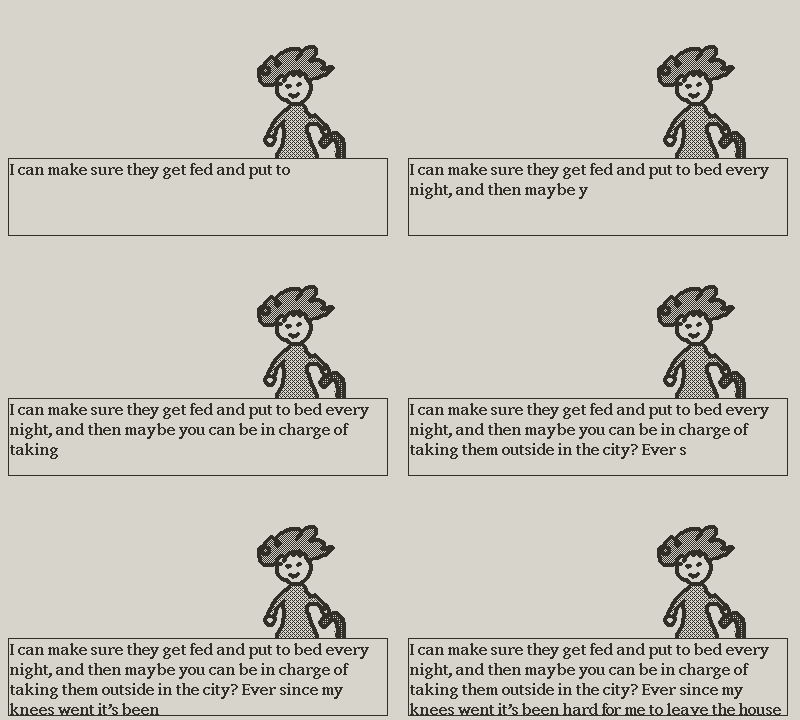
Words at the end of each line will only wrap midway through the printing effect due to their length changing over time. See below for an example on the words “night,” “taking,” and “knees,” at the end of each line. This artifact is visually distracting and disrupts the reading experience.
The most common solution in game engines like Unity is to use inline color tags. Instead of printing out a substring, you print out the whole string at once and just insert a color-changing tag at the edge of the dialogue progress, e.g.
I can make sure they get fed and put to bed every ni<color=clear>ght, and then maybe you can be in charge of taking them outside in the city? Ever since my knees went it's been hard for me to leave the house</color>
The <color=clear> tag will cause all the text after it to not actually be visible, but the word wrapping algorithm still gets the entire string for line formatting. So the starting “ni” characters of “night” will print on a new line, even when there is technically room for them on the previous one.
I realize this might sound like an edge case, but this type of animated text effect is very common. I’m sure people could also do other fun things by mixing text colors in a sentence.
Thanks for your consideration!