Playdate game telemetry example (networking)

Hi all!

Just got a working example of telemetry for a Playdate game. I literally just got it working and it's not yet in production, but given the lack of examples I reckon it wouldn't hurt to put it out there. :slight_smile:

It's using a single-file module, called TelemetryHandler. Here's the code:

TelemetryHandler.lua
local http <const> = playdate.network.http

TelemetryHandler = {
    isAccessGranted = false,
    url = nil,
    path = nil,
    httpTelemetry = nil,
    permissionReasonMessage = nil
}

local calls <const> = {}

function TelemetryHandler.create(url, path, permissionReasonMessage)
    TelemetryHandler.url = url
    TelemetryHandler.path = path
    TelemetryHandler.permissionReasonMessage = permissionReasonMessage
end

function TelemetryHandler.update()
    if #calls > 0 then
        -- Pop latest "call" on stack
        local call = table.remove(calls)

        call()
    end
end

local function _requestPermissionsAccess()
    local accessGranted = http.requestAccess(TelemetryHandler.url, nil, true, TelemetryHandler.permissionReasonMessage)

    TelemetryHandler.isAccessGranted = accessGranted
end

function TelemetryHandler.requestAccess()
    table.insert(calls, _requestPermissionsAccess)
end

local function _sendTelemetryData(data)
    if not TelemetryHandler.isAccessGranted then
        return
    end

    if not TelemetryHandler.httpTelemetry then
        TelemetryHandler.httpTelemetry = http.new(TelemetryHandler.url, 443, true,
            TelemetryHandler.permissionReasonMessage)
    end

    local request, error = TelemetryHandler.httpTelemetry:post(TelemetryHandler.path,
        {
            ["Authorization"] = "Bearer " .. SUPABASE_ANON_KEY,
            ["Content-Type"] = "application/json"
        },
        json.encode(data))

    if error then
        print("Error occurred making Telemetry call: " .. error)
    else
        print("Telemetry call in progress...")
    end

    TelemetryHandler.httpTelemetry:setHeadersReadCallback(function()
        print("Telemetry call finished with status code: " .. TelemetryHandler.httpTelemetry:getResponseStatus())
    end)

    TelemetryHandler.httpTelemetry:setRequestCallback(function()
        print("Request complete")

        local bytes = TelemetryHandler.httpTelemetry:getBytesAvailable()
        if bytes > 0 then
            print("Response: " .. TelemetryHandler.httpTelemetry:read(bytes))
        end
    end)

    TelemetryHandler.httpTelemetry:setRequestCompleteCallback(function()
        local error = TelemetryHandler.httpTelemetry:getError()
        if error then
            print("Error returned from Telemetry call: " .. error)
        else
            local bytes = TelemetryHandler.httpTelemetry:getBytesAvailable()
            print("Response: " .. TelemetryHandler.httpTelemetry:read(bytes))
        end
    end)
end

---comment
---@param data table
function TelemetryHandler.send(data)
    table.insert(calls, function()
        playdate.network.setEnabled(true, function(error)
            if error then
                print("Error occurred enabling network: " .. error)
            else
                print("Network connection status: " .. playdate.network.getStatus())
                table.insert(calls, function() _sendTelemetryData(data) end)
            end
        end)
    end)
end

On top of adding this file to your project, you'll need a back-end to handle your requests. I'll post my setup on Supabase (an open-source, highly advanced Backend-as-a-service/firebase alternative) which you can use as well. Setup steps will be in the next comment in the thread.

The usage is as follows:

_First, make sure the file is imported into your project, in main.lua or other.

import "path/to/TelemetryHandler"

Setup:

TelemetryHandler.create(
     "your.backend.com", -- Your back-end domain
     "/telemetry",                -- Request path
     -- "Reason" message when Playdate prompts for network permission access.
     "This game is still in early-access. We would like to monitor the difficulty of puzzles to ensure a smooth difficulty curve."
)

Sending telemetry:

    if not TelemetryHandler.isAccessGranted then
        TelemetryHandler.requestAccess()
    end

    TelemetryHandler.send(
-- Whatever payload you want in here! :)
{
        game_id = "Test123",
        world_name = worldCurrent.filepath,
        level_name = currentLevelName,
        rescue_bot = botNumber,
        key_config = "LRR",
        playtime_seconds = 1000
})

Edit: I forgot to mention - the TelemetryHandler doesn't directly call the HTTP or Networking methods, instead it places them on a stack (call) which should execute in playdate.update!

So don't forget to add this to your playdate.update / main.lua:

function playdate.update()
    ...

    TelemetryHandler.update()
end

1 Like

Here's the setup guide to get a Supabase back-end running.

  1. Create an account on Supabase (or go through the process of self-hosting, I haven't tried that yet!)
  2. Once logged in, create an organization and a project.
  3. Go to Edge Functions (_supabase.com/dashboard/project/your_project_id/functions), press "Deploy a new function", and select "Via Editor" (for the purposes of this guide).
  4. Paste in the following code into the editor:
Edge function code
import { createClient } from 'npm:@supabase/supabase-js@2';
console.info('Telemetry function starting');
Deno.serve(async (req)=>{
  const url = new URL(req.url);
  if (req.method === 'GET' && url.pathname === '/telemetry') {
    return new Response(JSON.stringify({
      status: 'ok',
      message: 'Telemetry endpoint'
    }), {
      headers: {
        'Content-Type': 'application/json'
      }
    });
  }
  if (req.method !== 'POST' && url.pathname === '/telemetry') {
    return new Response(JSON.stringify({
      error: 'Method not allowed'
    }), {
      status: 405,
      headers: {
        'Content-Type': 'application/json'
      }
    });
  }
  if (url.pathname !== '/telemetry') {
    return new Response('Not Found', {
      status: 404
    });
  }
  let body;
  try {
    body = await req.json();
  } catch (e) {
    return new Response(JSON.stringify({
      error: 'Invalid JSON'
    }), {
      status: 400,
      headers: {
        'Content-Type': 'application/json'
      }
    });
  }

  const payload = {
    // Parse `body` into the payload like the following:
    // game_id: String(body.game_id),
    // playtime_seconds: Number(body.playtime_seconds)
  };

  try {
    // Create the supabase client
    const supabase = createClient(Deno.env.get('SUPABASE_URL') ?? '', Deno.env.get('SUPABASE_ANON_KEY') ?? '', {
      global: {
        headers: {
          Authorization: req.headers.get('Authorization')
        }
      }
    });
    if (supabase !== null) {
      try {
        // Insert data
        const { error } = await supabase.from('telemetry_events').insert({
            // Add your payload data here
        });
        if (error) {
          throw error;
        }
        return new Response("", {
          headers: {
            'Content-Type': 'application/json'
          },
          status: 200
        });
      } catch (err) {
        return new Response(String(err?.message ?? err), {
          status: 500
        });
      }
    } else {
      return new Response(String("Client failed to be created."), {
        status: 500
      });
    }
  } catch (err) {
    return new Response(String(err?.message ?? err), {
      status: 500
    });
  }
});

This deploys:

    1. a GET handler on the /telemetry endpoint.
    1. a POST handler on the /telemetry endpoint, which takes in a JSON-body (the payload we saw before) and writes the contents to a new entry in the telemetry_events table in the database (which we will set up next).

Note: You will need to customize the "payload" to match what you are sending from your game. I actually also had some validation code to check the contents of the "request body" to ensure it was the right one, before performing the database insert.**

Here is my personal example which shows 1) parsing the incoming payload, 2) performing some basic validation, and 3) writing the same payload into the database:

Edge function code WITH VALIDATION (customize to your specific needs!)
import { createClient } from 'npm:@supabase/supabase-js@2';
console.info('Telemetry function starting');
Deno.serve(async (req)=>{
  const url = new URL(req.url);
  if (req.method === 'GET' && url.pathname === '/telemetry') {
    return new Response(JSON.stringify({
      status: 'ok',
      message: 'Telemetry endpoint'
    }), {
      headers: {
        'Content-Type': 'application/json'
      }
    });
  }
  if (req.method !== 'POST' && url.pathname === '/telemetry') {
    return new Response(JSON.stringify({
      error: 'Method not allowed'
    }), {
      status: 405,
      headers: {
        'Content-Type': 'application/json'
      }
    });
  }
  if (url.pathname !== '/telemetry') {
    return new Response('Not Found', {
      status: 404
    });
  }
  let body;
  try {
    body = await req.json();
  } catch (e) {
    return new Response(JSON.stringify({
      error: 'Invalid JSON'
    }), {
      status: 400,
      headers: {
        'Content-Type': 'application/json'
      }
    });
  }

  // VALIDATION STEP 1: Check all parameters are present.

  const required = [
    'game_id',
    'world_name',
    'level_name',
    'rescue_bot',
    'key_config',
    'playtime_seconds'
  ];
  for (const r of required){
    if (!(r in body)) {
      return new Response(JSON.stringify({
        error: `Missing field: ${r}`
      }), {
        status: 400,
        headers: {
          'Content-Type': 'application/json'
        }
      });
    }
  }

  // VALIDATION STEP 2: Parse values into payload

  const payload = {
    game_id: String(body.game_id),
    world_name: String(body.world_name),
    level_name: String(body.level_name),
    rescue_bot: Number(body.rescue_bot),
    key_config: String(body.key_config),
    playtime_seconds: Number(body.playtime_seconds)
  };
  // Basic validation
  if (!/^[A-Za-z0-9\-]{1,36}$/.test(payload.game_id)) {
  // allow simple uuid or id string
  // not strict enforcement
  }
  if (!/^[A-Za-z]{3}$/.test(payload.key_config)) {
    return new Response(JSON.stringify({
      error: 'key_config must be 3 letters'
    }), {
      status: 400,
      headers: {
        'Content-Type': 'application/json'
      }
    });
  }
  if (!Number.isFinite(payload.playtime_seconds) || payload.playtime_seconds < 0) {
    return new Response(JSON.stringify({
      error: 'playtime_seconds must be a non-negative number'
    }), {
      status: 400,
      headers: {
        'Content-Type': 'application/json'
      }
    });
  }

  // Validation finished.

  try {
    // Create the supabase client
    const supabase = createClient(Deno.env.get('SUPABASE_URL') ?? '', Deno.env.get('SUPABASE_ANON_KEY') ?? '', {
      global: {
        headers: {
          Authorization: req.headers.get('Authorization')
        }
      }
    });
    if (supabase !== null) {
      try {
        // Insert data
        const { error } = await supabase.from('telemetry_events').insert({
          game_id: payload.game_id,
          world_name: payload.world_name,
          level_name: payload.level_name,
          rescue_bot: payload.rescue_bot,
          key_config: payload.key_config,
          playtime_seconds: payload.playtime_seconds
        });
        if (error) {
          throw error;
        }
        return new Response("", {
          headers: {
            'Content-Type': 'application/json'
          },
          status: 200
        });
      } catch (err) {
        return new Response(String(err?.message ?? err), {
          status: 500
        });
      }
    } else {
      return new Response(String("Client failed to be created."), {
        status: 500
      });
    }
  } catch (err) {
    return new Response(String(err?.message ?? err), {
      status: 500
    });
  }
});
  1. Once you've added that code, you should be able to press "Deploy", and in the Details tab of your function, you'll find the Endpoint URL! (You can perform a GET request by pasting that URL in your browser navigation bar. You'll likely receive a Error 401: Missing authorization header".
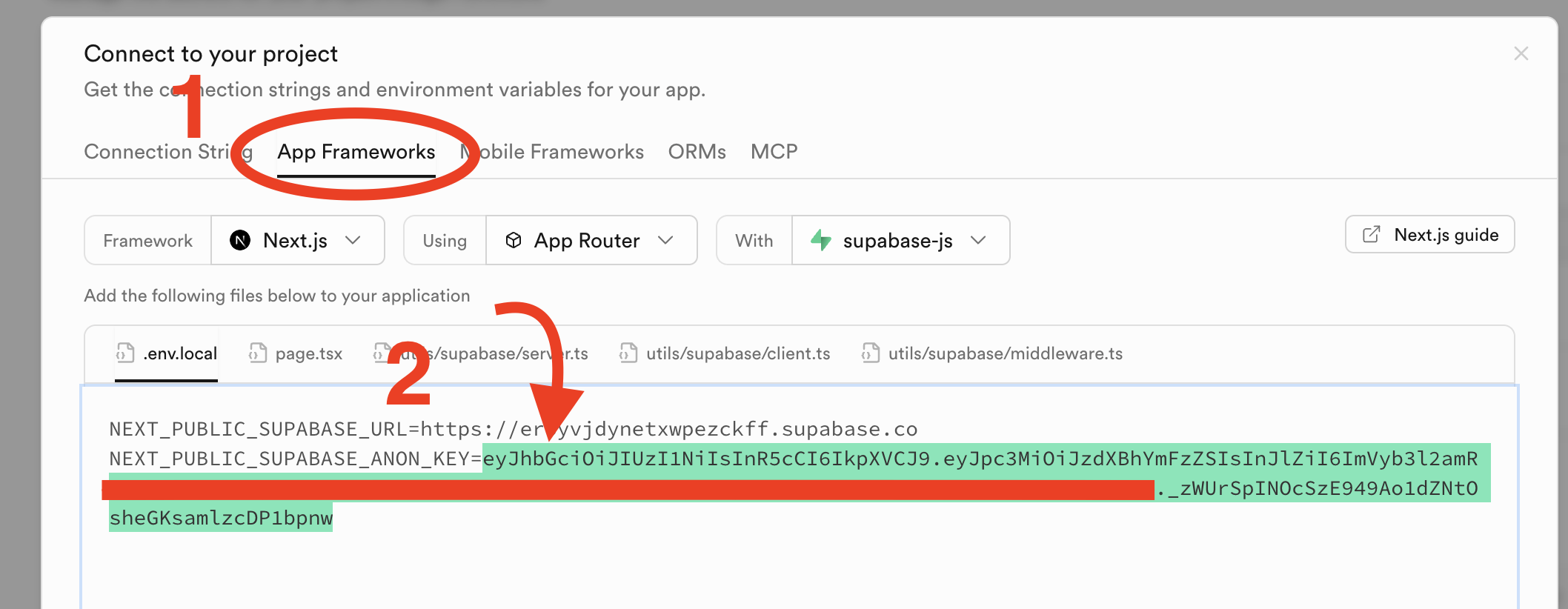
  2. Let's add basic authentication. Go to the "Connect" tab in the top bar (see image below)

  1. Go to the second tab, "App Frameworks", and while "Playdate" isn't there yet ( :stuck_out_tongue: ), you can just use "Next.js" instead. Copy the NEXT_PUBLIC_SUPABASE_ANON_KEY value, highlighted in green below. We'll use that in our Playdate project.
  1. In your project, create an env.lua in source (or wherever you like), add it to your .gitignore (e.g. source/env.lua), and paste in the key with the prefix SUPABASE_ANON_KEY = . You should end up with a line like:
SUPABASE_ANON_KEY = "eyJhbGciOiJIUzI1NiIsInR5cCI6IkpXVCJ9...."

You should keep this key secret! In the future, I might make a library to parse it from multiple hashes in run-time so that someone can't just peek into the .pdx and find it. On Catalog, the contents should be safe due to the Playdate's DRM, but it's at risk when published on itch.io.

  1. Now we need to configure the database. Go to the Database tab of your project, then navigate to Tables, and press Create Table on the right.
  2. As the name, put in telemetry_events. Keep RLS (Row level security) enabled, we'll configure that next. Finally, add columns for whatever data points you'd like to collect. I recommend keeping the two defaults ones there (id for unique identifier and createdAt for the creation timestamp). Once configured, you can press save.
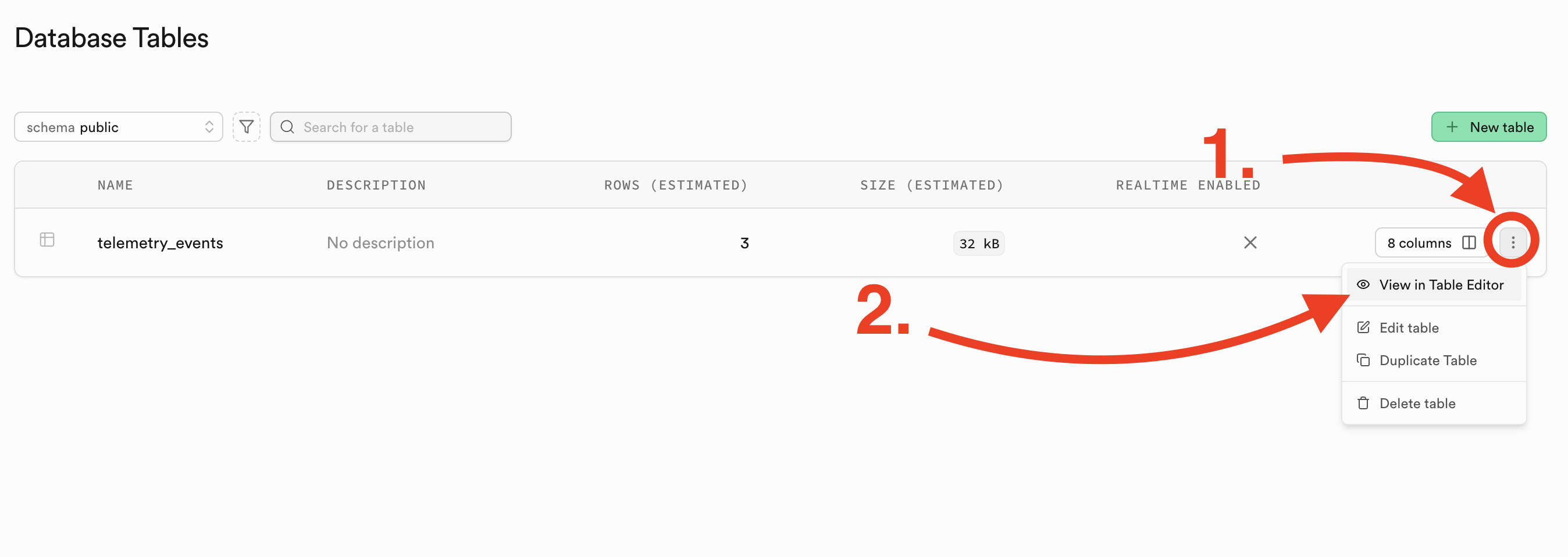
  3. You'll see your table listed in the page. Press the three dots on the right, then "View in Table Editor" to navigate to your table.

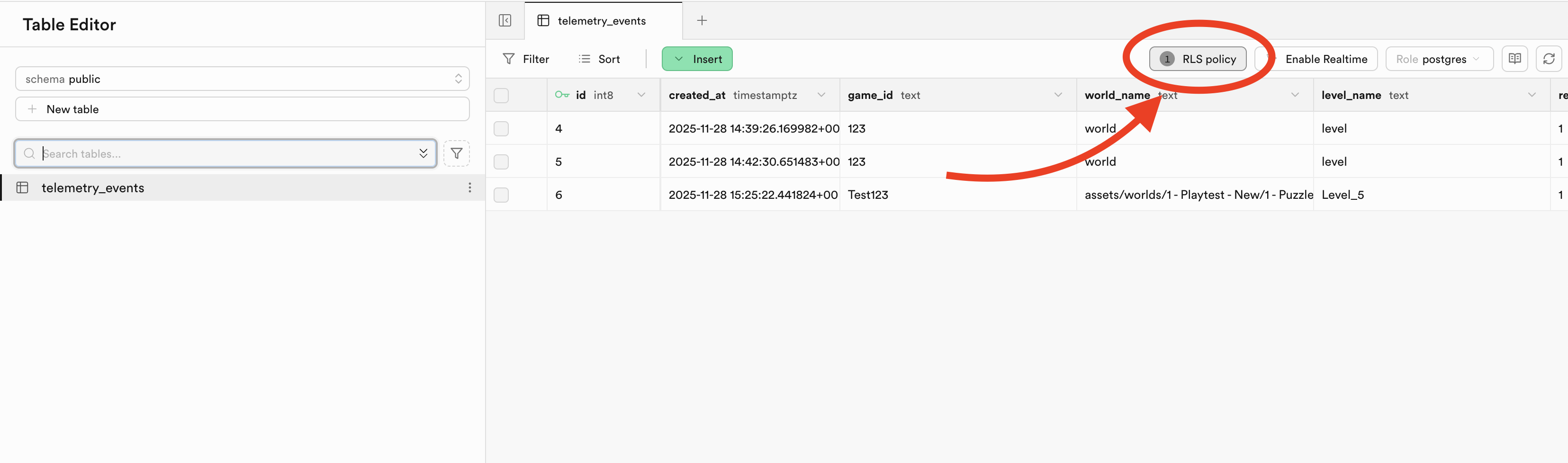
  1. Your table's contents will be empty, but you can find the "RLS Policy" button on the right side. Click to navigate to the policy editor.

  1. On the right side again, press "Create Policy". Then, in the editor, select INSERT as the Policy Command, and anon as the Target Roles. Add a name to the policy (e.g. "Allow authorized anon to INSERT"), and you can leave "Permissive" as the Policy Behavior. Then, click "Save Policy".

And you should be good to go on your back-end!

Ensure the URL is the correct on on your Playdate:

Setup:

TelemetryHandler.create(
     "your_supabase_project_id.supabase.co", -- Your back-end domain
     "/functions/v1/telemetry",                -- Request path
     -- "Reason" message when Playdate prompts for network permission access.
     "This game is still in early-access. We would like to monitor the difficulty of puzzles to ensure a smooth difficulty curve."
)

Sending Telemetry:

if not TelemetryHandler.isAccessGranted then
        TelemetryHandler.requestAccess()
    end

    TelemetryHandler.send(
-- Ensure whatever payload is in here matches both your newly-created table schema and the Edge function code!
{
        game_id = "Test123",
        world_name = worldCurrent.filepath,
        level_name = currentLevelName,
        rescue_bot = botNumber,
        key_config = "LRR",
        playtime_seconds = 1000
})

Let me know if this works for you, or if you have any issues, feel free to post them here or to reach out to me!

2 Likes