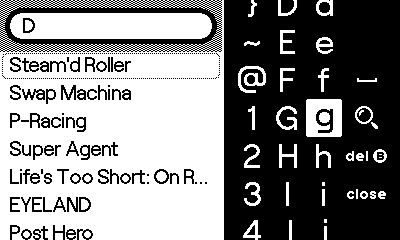
I want to replicate the search interface from GameLibrary in my application — specifically the keyboard appearance and behavior where the keyboard stays open when pressing the search button and shows a magnifying glass icon instead of the standard OK button. However, I want to search through my app's content, not the game library.
I've decompiled the GameLibrary code but didn't find a custom keyboard implementation or search-specific keyboard handling. How does GameLibrary achieve this? Is there an API for customizing keyboard menu button images that I'm missing? Does GameLibrary use a different approach to keep the keyboard open during search? Is this functionality only available to system apps, or can regular apps also customize keyboard button icons?
Is there a way to prevent the keyboard from closing when OK is pressed, or to cancel the hide animation once it starts? Alternatively, is there a way to detect which keyboard column is selected so I can intercept the A button only when OK would be triggered?
What I've tried:
-
keyboardWillHideCallback — The callback runs after the hide animation starts, so I can't prevent it.
-
keyboardAnimatingCallback — Tried calling
show()during the hide animation, butshow()returns early ifkeyboardIsVisibleis still true (line 868 in CoreLibs/keyboard.lua). -
keyboardDidHideCallback — Re-showing after hide works, but causes a visible flash.
-
Input handler interception — Intercepted the A button before it reaches the keyboard, but can't detect if the menu column (OK) is selected vs. typing a letter.
Current workaround:
Re-showing the keyboard immediately after it hides works, but causes a visible animation flash, which isn't ideal for UX.
SDK Version: 3.0.1